Automating Freight Invoicing: A Step-by-Step Approach
Author:
Pamela
Published On:
1 min read
Freight invoicing sounds simple until you actually start doing it. One shipment has multiple touchpoints, multiple vendors, multiple surcharges, and sometimes multiple currencies. If you have ever chased missing bills, corrected wrong rates, or waited for someone to update a spreadsheet, you already know how quickly errors add up. At that point, you are not just losing time - you are losing margin.
The good news is that you do not have to stay stuck in manual chaos. Industry data suggests that up to 10–15 percent of freight invoices contain errors, largely due to disconnected operations and finance workflows. When invoicing runs on shared, real-time data, many of these issues disappear.
In this guide, we take a practical, step-by-step look at how freight invoicing automation works and why an automated financial workflow is increasingly becoming a strategic necessity, not just an operational upgrade, for modern freight teams.
What is Automating Freight Invoicing?
Automating freight invoicing means letting software handle every step involved in creating, validating, and sending invoices by integrating your freight forwarding software directly with your financial ledger. Instead of typing data manually, the system uses API and EDI feeds to pull real-time information from shipment files, rate contracts, and vendor invoices.
It applies your pricing rules, calculates charges, validates values, and generates accurate invoices automatically. In simple terms, it is the shift from chasing data across systems to having the system capture and connect data for you.
In simple words, it is the shift from chasing data to the system capturing data for you.
Common Problems With Manual Freight Invoicing
Freight invoicing is one of the most error-prone functions because it depends on too many moving parts. Some common issues include:
Missing charges because someone forgot to add handling or demurrage.
Wrong rates due to outdated contracts or manual calculations.
Delayed billing because vendor bills arrive late or teams work in silos.
Duplicate entries across spreadsheets, emails, and ERP systems.
Disputes caused by mismatches between operations data and billing data.
Slow cash flow because invoices go out days or weeks after job completion.
Manual work does not just waste time. It directly affects margins, customer trust, and the health of your receivables.
Comparison
Feature | Manual Process | Automated (CargoEZ) |
Data Entry | 15-30 mins per shipment | < 1 minute (Auto-populated) |
Error Rate | 5-15% (Human error) | < 1% (System-validated) |
Surcharge Recovery | Often missed/forgotten | 100% capture via logic rules |
Dispute Resolution | Weeks of email chains | Instant (Full audit trail) |
Benefits of Automating Freight Invoicing
When you automate freight invoicing, you remove repetitive work and let your system handle complexity. This brings several clear advantages:
1. Faster billing cycles
Invoices go out immediately after a shipment is marked completed. No more waiting for someone to collect data.
2. Higher accuracy
The system applies the correct rates, surcharges, taxes, and currency rules without human calculations.
3. Fewer disputes
Automation reduces missing charges and avoids mismatched values, which means customers receive clean, consistent bills.
4. Better cash flow
Faster invoices lead to faster payments, and automated reminders keep customers informed.
5. Full visibility
Your team gets a real-time view of billed, unbilled, and upcoming invoices, which improves financial planning.
6. Lower operational load
Your team can focus on customer service and higher-value tasks while the system handles repetitive billing steps.
Step-by-Step Approach to Automating Freight Invoicing
Automation does not have to be overwhelming. Here is a simple and practical workflow that any freight forwarder or logistics provider can follow.
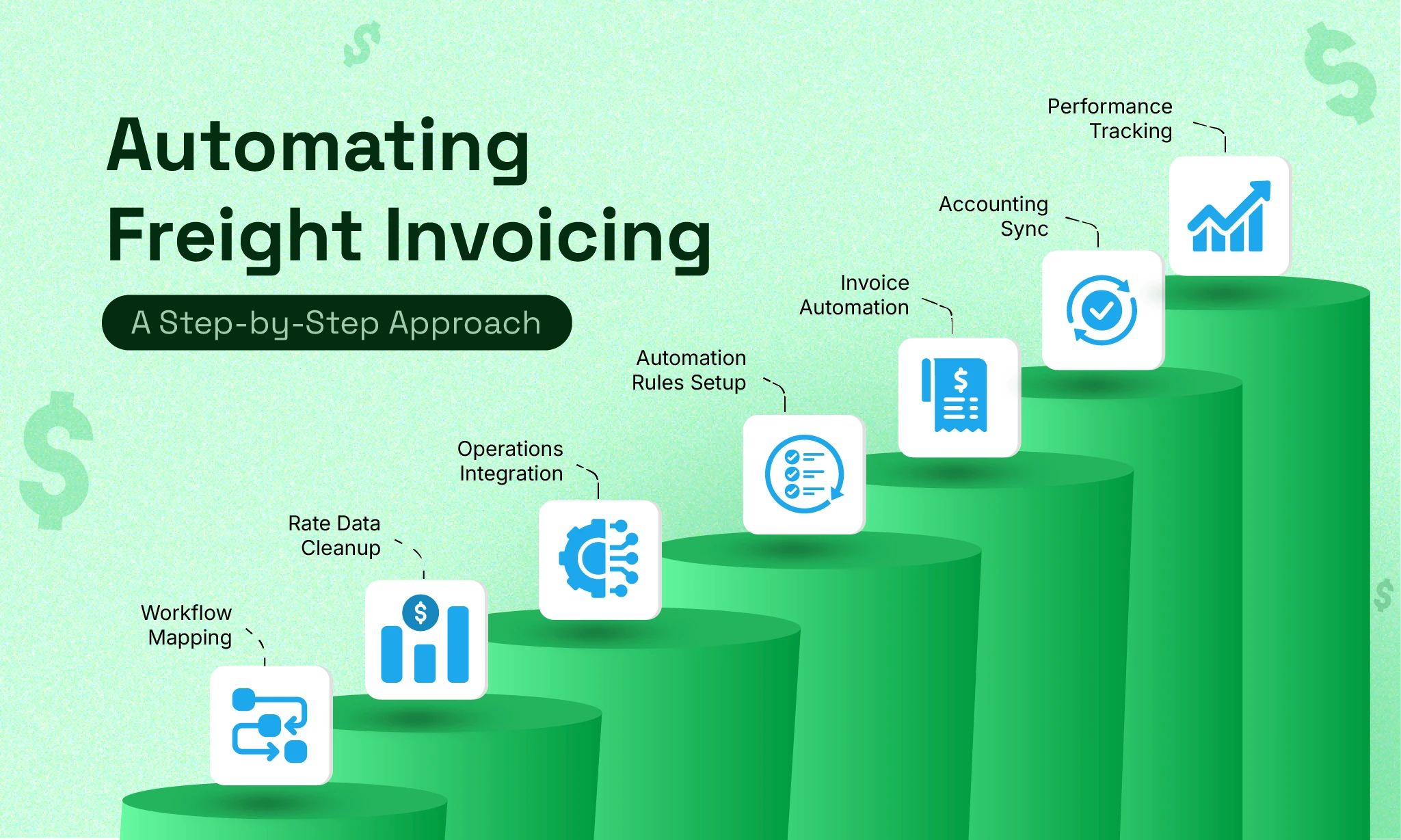
Step 1: Map your existing invoicing workflow
Start by understanding how you invoice today.
Who enters charges?
Where does your team collect vendor bills?
Which steps cause delays?
This step helps you identify gaps and decide what needs automation first.
Step 2: Clean and organize your rate data
Automation works best when your rates are consistent.
Upload or digitize your contracts, rate tables, fuel surcharges, and customer-specific pricing.
Clear and structured rate data leads to accurate invoices every single time.
Step 3: Integrate your operations data
Your invoicing tool should pull shipment details from your TMS or job files.
Once the system knows job status, weight, volume, carrier charges, and milestones, it can calculate the final amount automatically.
Step 4: Set automation rules
Define automation rules such as:
Generate an invoice when a shipment reaches a defined milestone (for example, delivered or vessel arrival).
Apply specific surcharges when predefined conditions are met.
Trigger an approval workflow if the invoice amount exceeds a set threshold.
Send automated payment reminders after a defined period of non-payment.
These rules ensure consistency and control without requiring constant manual supervision.
Example:
Event: Vessel arrived at port
Action: Automatically trigger the invoice for local charges and drayage. This ensures the bill reaches the customer before the cargo reaches their warehouse.
Step 5: Automate invoice generation
Your system should create invoices as soon as the required data is available.
It formats them professionally, applies taxes, calculates totals, and attaches supporting documents like PODs or vendor bills.
Step 6: Enable digital delivery and accounting sync
Send invoices directly to customers via email or the customer portal.
Sync them with your accounting software so finance does not enter the same data again.
Step 7: Track performance and fine-tune
Once automation is running, monitor:
Error rates
Time taken from job completion to invoice sent
Pending approvals
Disputes raised by customers
This helps you improve your process further.
Tools and Technologies Used in Freight Invoicing Automation
Freight invoicing automation typically involves a combination of:
1. Freight forwarding or TMS software
This captures job details, milestones, weight, carrier costs, and documentation.
2. Rate management modules
Rate management modules store client-specific rates, surcharges, contracts, and zones.
3. OCR or AI for vendor invoice capture
For reading third-party bills without manual typing.
4. Workflow automation
For auto invoice triggers, reminders, approvals, and exception handling.
5. Accounting integrations
For syncing invoices, payments, and financial reports with systems like Zoho Books, QuickBooks, or Xero.
6. Customer portals
By utilizing a dedicated customer portal, clients gain the autonomy to view invoices, download documents, and track payment status.
Together, these tools remove redundant work and ensure both operations and finance teams work with the same data.
Real-World Examples
Case 1: The Multimodal Forwarder
Challenge:
A freight forwarder handling sea-to-rail shipments frequently missed storage and railhead charges during invoicing. These costs were paid to vendors but were inconsistently passed on to customers because rail milestones were tracked separately from billing.
Solution:
Invoice automation links rail tracking events directly to the billing engine. When the shipment reached the railhead or crossed a predefined dwell-time threshold, the system automatically applied the relevant storage and handling charges.
Result:
The forwarder recovered costs that were previously absorbed internally, leading to a measurable increase in annual net profit without increasing shipment volume or customer rates.
Case 2: The Global 3PL Managing Multiple Currencies
Challenge:
A global 3PL invoicing customers in EUR, USD, and GBP struggled with exchange rate inconsistencies. Month-end reconciliation took days because invoices, vendor bills, and accounting entries used different conversion methods and dates.
Solution:
Automation applied standardized, daily exchange rates across job costing, invoicing, and accounting entries. All currency conversions followed the same logic and audit trail.
Result:
Month-end closing time dropped significantly, finance teams spent less time reconciling differences, and invoice disputes related to currency mismatches were largely eliminated.
Case 3: The Regional Forwarder With Slow Billing Cycles
Challenge:
Invoices were delayed because PODs and vendor bills arrived late and had to be manually checked before billing. On average, invoices were sent several days after shipment completion.
Solution:
Automation triggered invoice generation based on defined operational milestones, with supporting documents automatically attached as they became available.
Result:
Invoices were sent faster, cash flow improved, and the billing team reduced manual follow-ups without compromising control.
Why Should You Choose CargoEZ for Freight Invoice Automation?
CargoEZ makes invoice automation simple for freight forwarders and logistics operators. It connects your shipment data, rates, and vendor costs in one place so your invoices stay accurate and consistent.
Auto-generate invoices as soon as a job is completed
Apply correct rates for air, sea, road, or multimodal shipments
Capture vendor bills digitally
Reduce errors caused by manual updates
Give customers clean, transparent invoices every time
Sync billing with your accounting system
You spend less time correcting mistakes and more time growing your freight business.
Conclusion
Freight invoicing does not have to be a complicated, stressful process. When you automate it, your system takes care of calculations, validations, document collection, and delivery. The result is faster billing, fewer errors, and better cash flow.
Start small, automate step by step, and let your invoicing workflow become one of the smoothest parts of your logistics operation.
Frequently Asked Questions (FAQ)
1. What types of companies benefit from freight invoicing automation?
Freight forwarders, trucking companies, customs brokers, warehouses, and multimodal logistics providers all benefit because they deal with complex charges and multiple vendors.
2. Does automation reduce the risk of missing charges?
Yes. The system applies predefined rate rules and surcharges automatically, which prevents missed revenue.
3. Can I still review invoices before sending them?
Absolutely. Automation assists with data and calculations, but you can keep manual approvals for high-value invoices or special customers.
4. What if vendor bills arrive late?
OCR and digital capture let you upload them instantly. The system updates job costing and corrects any differences.
5. How long does it take to implement invoice automation?
Most businesses can start within a few weeks, depending on their data readiness and integrations.
Author

Don't forget to share this blog!